
What I learned managing an AI developer while seeking enlightenment

Summary:
How I built a complete forum app in 2 weeks using AI-assisted development
The clever architecture behind GitHub Pages + Firebase Functions + automated commits
Real challenges and limitations when working with AI coding tools
Practical lessons for "managing" an AI developer
The Genesis: From Motorbikes to Meditation
When it comes to AI tools, I have very limited exposure. The last few years of my life have been spent riding motorbikes across continents, and currently I'm pursuing spirituality full-time. Well, back in my younger days, I was an entrepreneur and was definitely abreast with what was happening in the tech world then. I even developed a learn-to-code website where I could single-handedly build and embed a cloud IDE in the browser so that we could create tutorials which involved building an app, and our users could build an actual app right there in the browser. We got funded for this innovation, but well, rest is actually history—nothing worthwhile happened except CodeSchool offering to buy us out, but after listening to our funding story, they backed out. A few years later, we shut shop.
Another interesting thing that happened then was meeting Nishant Soni, who is currently building NonBioS.ai. Nishant back then graciously let me use his office space for free, and we had a lot of interesting conversations.
Fast forward to a month ago: I came to Isha Yoga Center for their 2025 batch of Sadhanapada. Isha Yoga Center is the brainchild of Sadhguru, a mystic from India who rides motorbikes across the world (no, I'm not his follower just because both of us are cross-continental motorbikers 😊).
I got assigned to the IT Infrastructure department for my seva (in IYC, you do your meditations—also called Sadhana—and volunteer to work during the rest of the time, which is called seva). The first few weeks involved me seeking work from different people on the team. It felt like corporate, but the whole point of ashram life is that you learn to be happy in whatever situation you're in, with whatever work (or lack thereof) you get.
During orientation for Sadhanapada, we were told that the place is intentionally kept with a certain level of chaos, as it's required for spiritual seekers. Just the right level—a little more and you would quit, a little less and you would settle in and stop seeking. Point taken. But my 'entrepreneurial' mind was like—there has to be a way to reduce the chaos a bit.

View of Isha Yoga Center, from Suya Kunda Mantapa, where people sit to do their sadhana/meditation
The Spark: An Anonymous Forum for Seekers
I figured I had a lot of questions related to sadhana (we did different kinds of meditations), with my seva (are there other departments where people are chilling too, or is it just us?), with life at IYC, etc. I felt—what if I create an anonymous forum where people could just ask/share things, and maybe it will become popular enough that they get responses too? Well, it may not become popular at all, but no harm trying (or rather, killing time at seva).
I had in the past used GitHub Pages quite a bit to showcase my next upcoming ideas, but then never got the enthusiasm to work on them (this is after my active entrepreneurial career ended in 2015). I was aware that websites on GitHub Pages are free and fast (they are Jekyll pre-created pages). To add any new page/content, you essentially need to do a new git commit and push. I was like—if this commit and push can be hooked to a form submission, we have a proper web app (bare bones, but still).
My last official stint in the UK made me work with Firebase, and I had this idea cross my mind then—what if a form on a GitHub Pages website submits to a Firebase function, which has the GitHub repo PAT (personal access token) and does the commit and push? Then I have actions configured in GitHub which will deploy the change to the site, and voila—I have the forum running, which is efficient (all forum content is pre-created and hence super fast to serve) and nearly free, as GitHub Pages is free and Firebase functions are free for a million calls per month.
Here's how the architecture works:
Frontend: GitHub Pages hosts a Jekyll site with forms
Backend: Firebase Functions receive form submissions
Magic: Firebase function uses GitHub API to commit new posts/comments directly to the repo
Deploy: GitHub Actions automatically rebuilds and deploys the site
Result: A fast, nearly free forum that scales well
First Contact: Initial Success with Nonbios
Around a year back, Nishant told me about Nonbios, and I gave it a shot to try to build a long-pending idea I had in the personal finance space but with a social touch. That was my first interaction with Nonbios. It seemed like ChatGPT at first, but under the hood, it was writing code, running it, hosting it, and giving me the URL. All great. But I was building a mobile app, and it didn't have the emulator to run my app. I spent some time solving this problem but soon lost enthusiasm, and the project got onto the back burner.
This time, equipped with my forum idea, I decided to start my second stint with Nonbios. I asked it to create me a GitHub repo with an index.html which is a form that will submit data to a Firebase function, and the function will do a git commit and push to the GitHub repo. I asked Nonbios to do the Firebase function as well.
Nonbios gave me this commit. This has only form code as I chose NOT to add Firebase function code since it had my PAT in it.
My First Impression of Nonbios
Wow, the form had quite a bit of jazz. I always struggle with CSS, and Nonbios had done a great job at it.
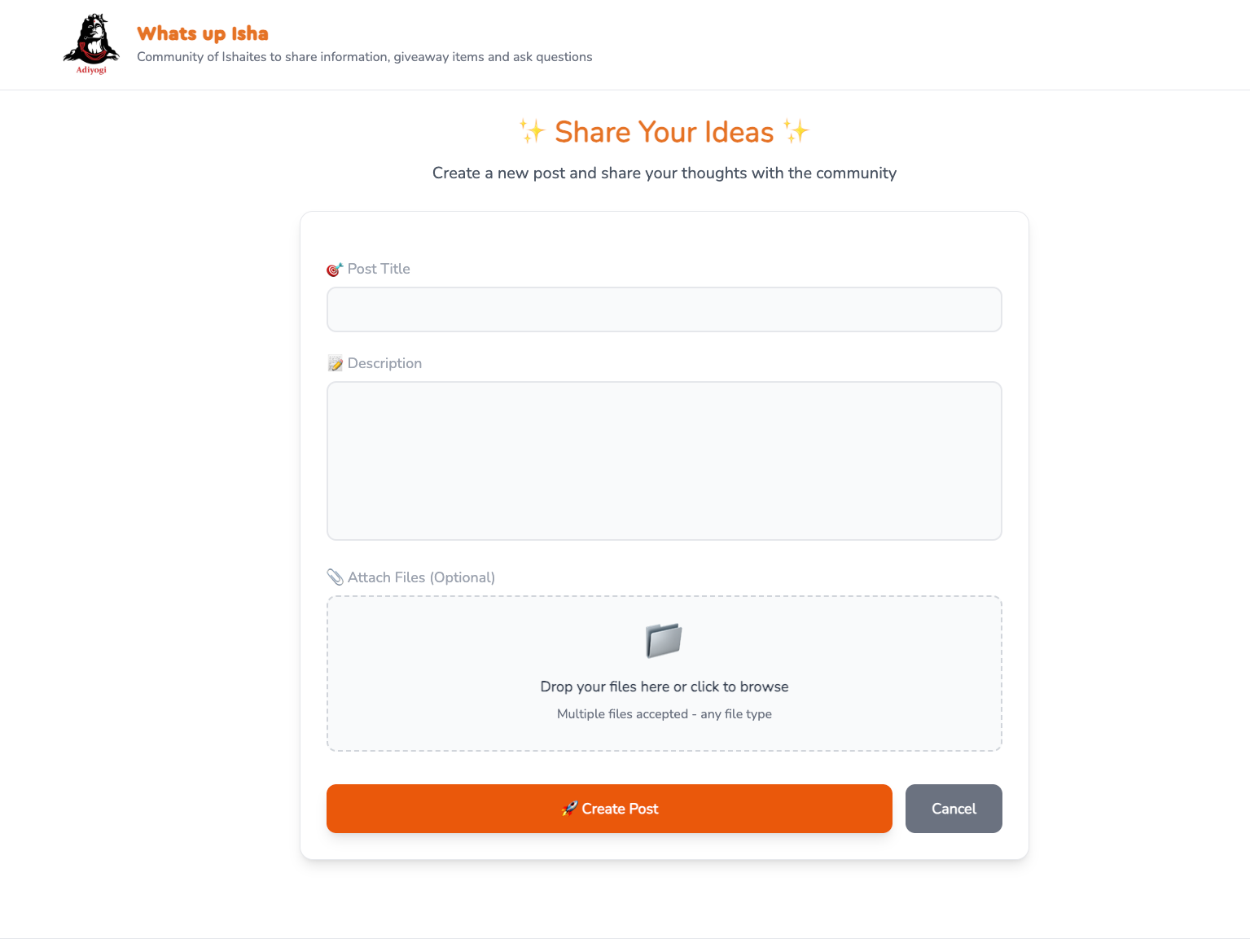
The final post form which is now live
The whole setup worked. Unlike the older versions of ChatGPTs where it would give you code that you would copy-paste and it would throw some error, that was not the case with Nonbios. Since the function had to be deployed to Firebase, I copy-pasted the code from Nonbios to my PC, then did 'firebase deploy', and then did a manual submission from index.html. Voila—the commit came into GitHub.
The Firebase functions were added to GitHub much later when I took out all the confidential stuff into a .env file. GitHub commit here.
So now the PoC was done, and I knew the idea could potentially work. I was all set to use Nonbios's help to get my forum app up. I thought it should not take more than a few days. I needed a Jekyll website with a mobile-optimized theme, Firebase functions to process posts and comments, and to map a domain. There would be a few cosmetic changes, so it should not be a big deal.
It actually took more than 2 weeks to get everything up. This post details my 2-week journey.
Battle #1: File Upload Challenges
Nonbios's first version was very extensive, with file uploads, etc. I figured Nonbios did not follow an 'incremental' approach to build. Later, I also figured that it's better to give Nonbios the big picture with finer details for it to give you a good starting point of the app in a single shot, and then you, as a human, do incremental changes.
Anyway, back to the problem: the code Nonbios gave broke when I tried to upload a file alongside the post. Nonbios was using a library called 'multer', which apparently isn't very compatible with Firebase Functions. I had hoped that Nonbios probably should know these things, but anyway.
I prompted Nonbios about the issue, and it very quickly replaced Multer with BusBoy. I don't have exact memory, but it seemed like I was feeling the issue was somewhere else and not in Multer, but Nonbios changed the library itself. I asked Nonbios to push the change to GitHub (branch), I pulled the code locally, deployed to Firebase, and tested. To my surprise, it worked. Nonbios had solved the problem without any celebration—very modest of it. [commit]
The Human Touch Still Matters
Hmm, wait—maybe I spoke too soon. I think there were some issues with Busboy which Nonbios could not figure out. Don't remember exactly, but it was something with req.pipe(busboy) needing to be replaced with busboy.end(req.raw). I'm not an expert, and I just googled these things. I made the change, and the file upload finally worked. I was overjoyed. I had beaten Nonbios. After all, machines can't be as intelligent as humans, right? [commit].
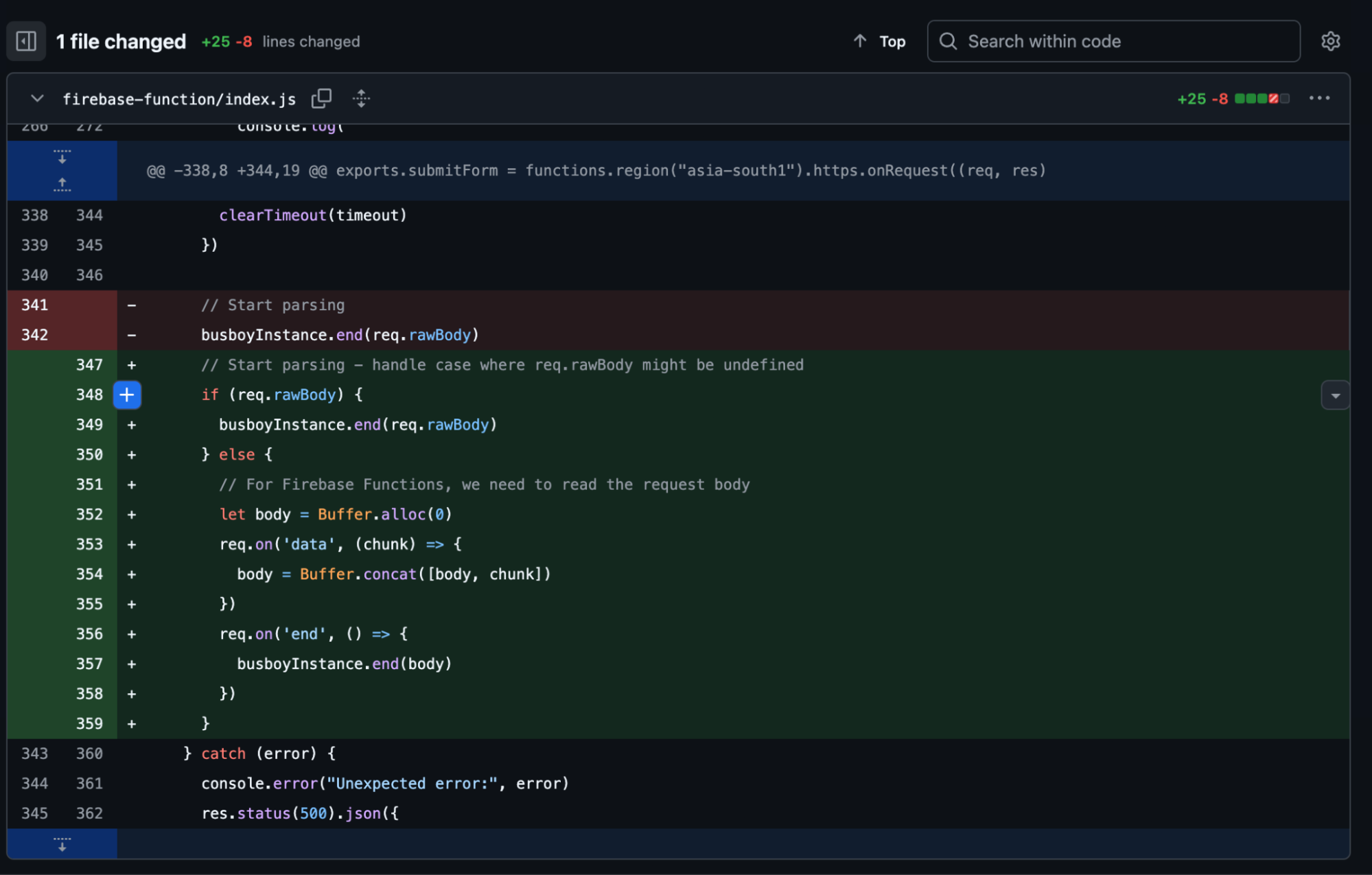
The change from the commit
My happiness was short-lived, though. I had made the change and pushed to GitHub from my local PC. I never told this to Nonbios (I was a bit angry with it, TBH). I remember that when asking for the next change, Nonbios reverted this part. I was mad. But well, Nonbios wasn't exactly a human whom you could scold to take your madness out on.
I reverted back the line, pushed to GitHub, asked Nonbios to pull the code, and explained to it why the line was needed. Nonbios took note, and in future changes, it did not revert the code. I realized I had become a slightly better Engineering Manager.
Feature Development Sprint
Next Feature: Comments
After making some cosmetic changes, I was eager to task Nonbios to do something big. Now that the posts were coming out fine, it was time to get comments. I told Nonbios, and came the change—blazing fast . [commit].
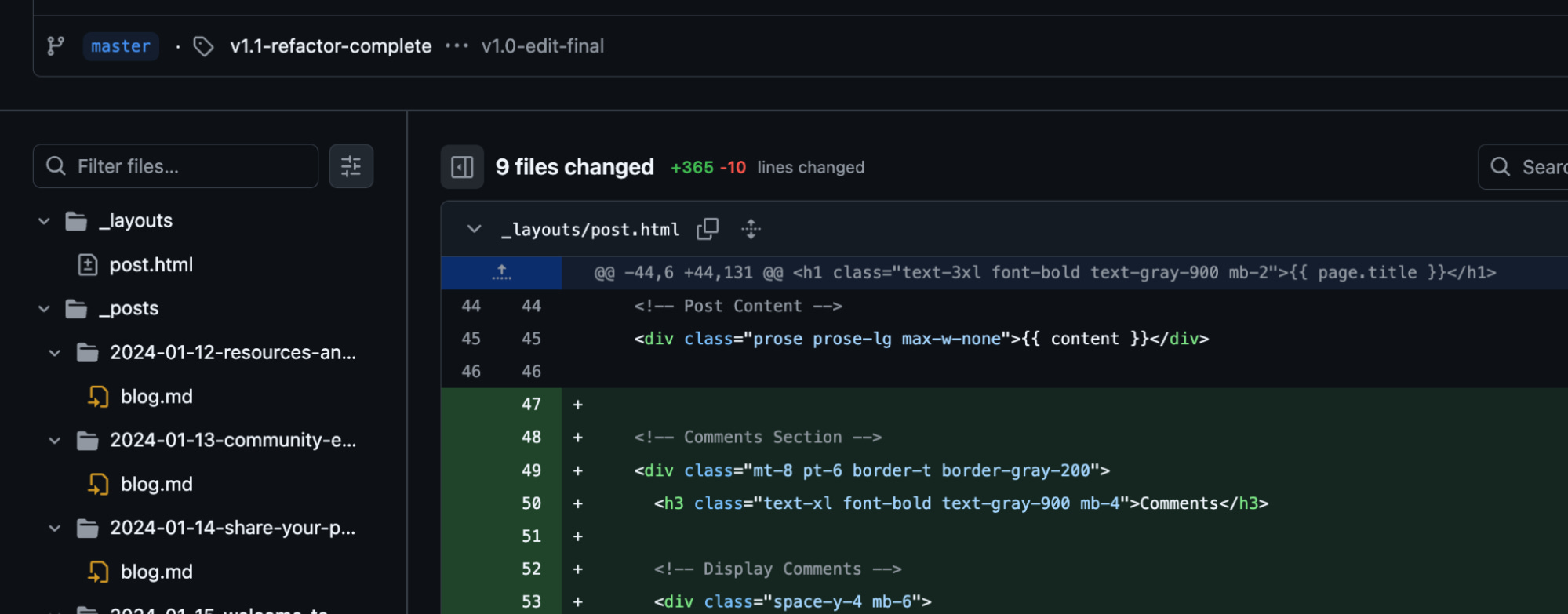
365 lines of code generated by Nonbios in few minutes. Large commits take as much time as small ones
What was now clear to me was that Nonbios does super big things as fast as small one-line changes. It took me a bit of time to adjust to this. As an incremental developer, I started with incremental prompts, only to realize that given the amount of back-and-forth Nonbios takes to create and validate the plan with you, it can as well do the bigger things, and it takes the same amount of time.
As for the comments feature, Nonbios had done a decent job. It remembered the Busboy file closing hack and made sure it used it. The code written was similar to the post submission handling code. There was a good amount of replication, but well, I didn't want to act like one of those super strict Whiplash-teacher-like managers.
Refactoring: The Next Logical Step
The next logical thing was to tell Nonbios to refactor the code to avoid duplication. Both post and comment created commits to GitHub but with different paths. Both required reading data with Busboy. I personally was not happy seeing so much verbose Busboy code, which led me to start with the refactor. Also, Nonbios was sending the content and images as two separate commits, and that was leading to GitHub actions running twice. I prompted Nonbios about this, asking it to figure out a way to combine all files in one commit. It was quick to figure this out, and this also became part of the refactor feature.
Nonbios did a decent job with the prompts. It created parseMultipartData(), createSingleCommit(), and handleJekyllPost(). Although the last function was post-specific, I didn't want to be super strict about it. Here's how the file looked.
Battle #2: The Refactor Complications
It all looked like clean code. I could also understand it fairly well at the moment. But testing revealed that images were now coming in as base64 encoded text. I was tempted to revert it, but then I felt—well, I have Nonbios, I can do this. But this time again, I had to figure the solution myself. But looking back, it was not Nonbios's mistake. Let me explain.
The Undocumented GitHub API Quirk
A file to be committed needs to be added as utf-8 if it's a text file or encoded as 'base64' if it's a binary (image) file. Nonbios had done this by the book. There's another function, createBlob(), that can be used, but looking at git documentation, it wasn't clear if it was actually required, as all you need to provide is file path, encoding, and content.
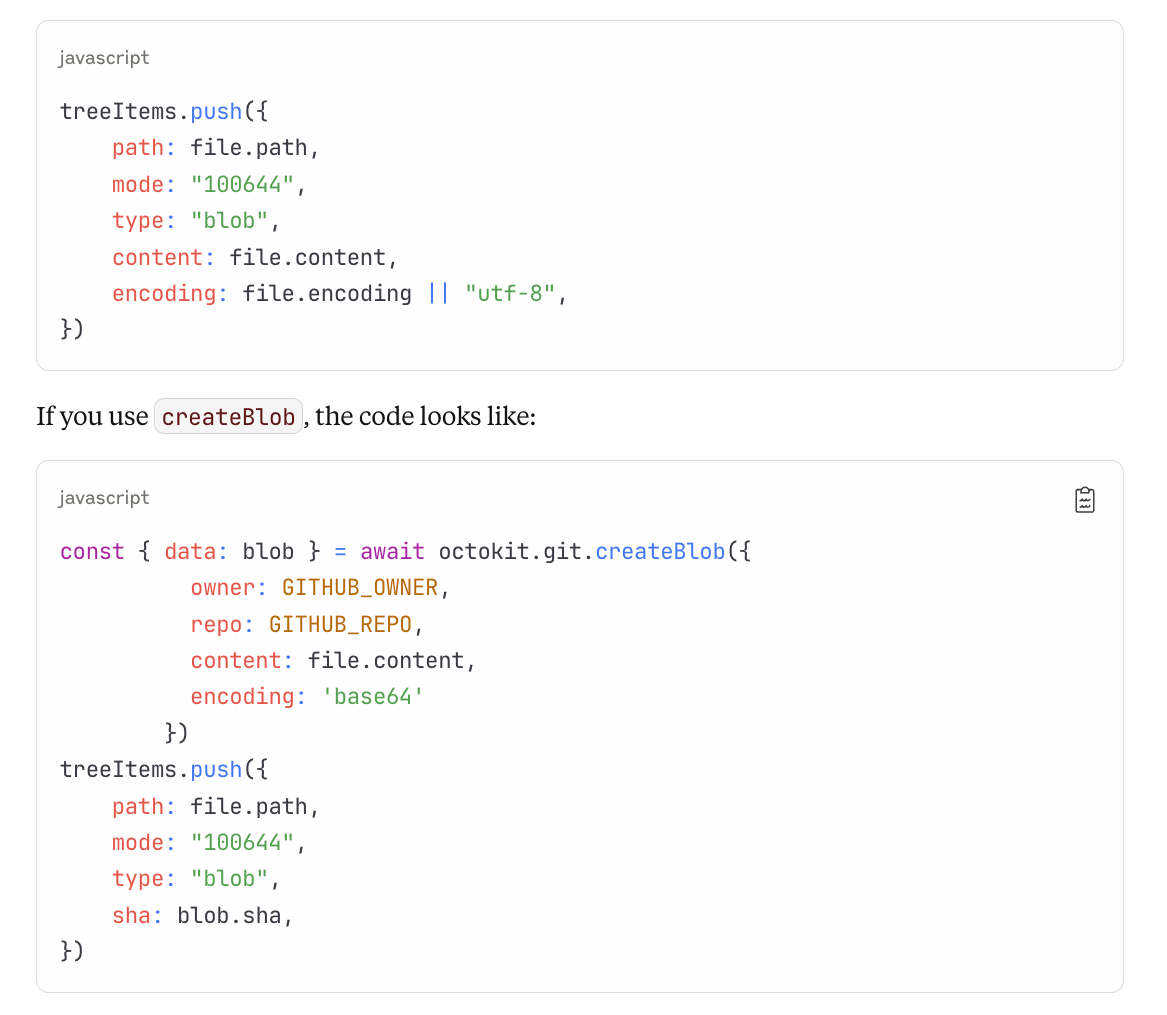
Code to add files to Github commit. The first code block is for utf-8 (text) file but for adding an image, the second code block is the right code.
You don't pass file content but the blob.sha. It looked like both strategies should work. What was NOT documented anywhere is that for binary files, you have to go down the blob way. First create a blob with the image, then pass the blob.sha while queuing the commit files.
I kept prompting Nonbios to solve the issue, and it kept suggesting that the problem must be in reading the image file from Buffer code. I felt annoyed at some point, but then I asked Nonbios to add the image file by creating Blob first. It did, and it worked. TBH, I don't think even Nonbios was sure this would work. So we kind of shot in the dark, and it worked out for us. [commit].
The Reality Check: AI Limitations Exposed
This refactor effort also surfaced another important issue with Nonbios, which became my biggest concern in the coming days. While Nonbios reads and understands code perfectly—which enables it to pinpoint bugs by just reading the code—the incremental changes come with a lot of flaws.
It would:
Miss out on removing braces
Have duplicated code because of missing to remove the entire old code
Do multiple iterations to fix issues, sometimes failing to fix entirely
Not test for syntax errors and end up committing syntactically incorrect code
For example: this commit.
I think I was pretty enamored with the progress that I didn't pay much attention to the issue. It became pretty prominent later, and after giving feedback to Nishant, his team actually fixed it. Last I tried Nonbios a day before writing this post, Nonbios was pretty good with incremental edits.
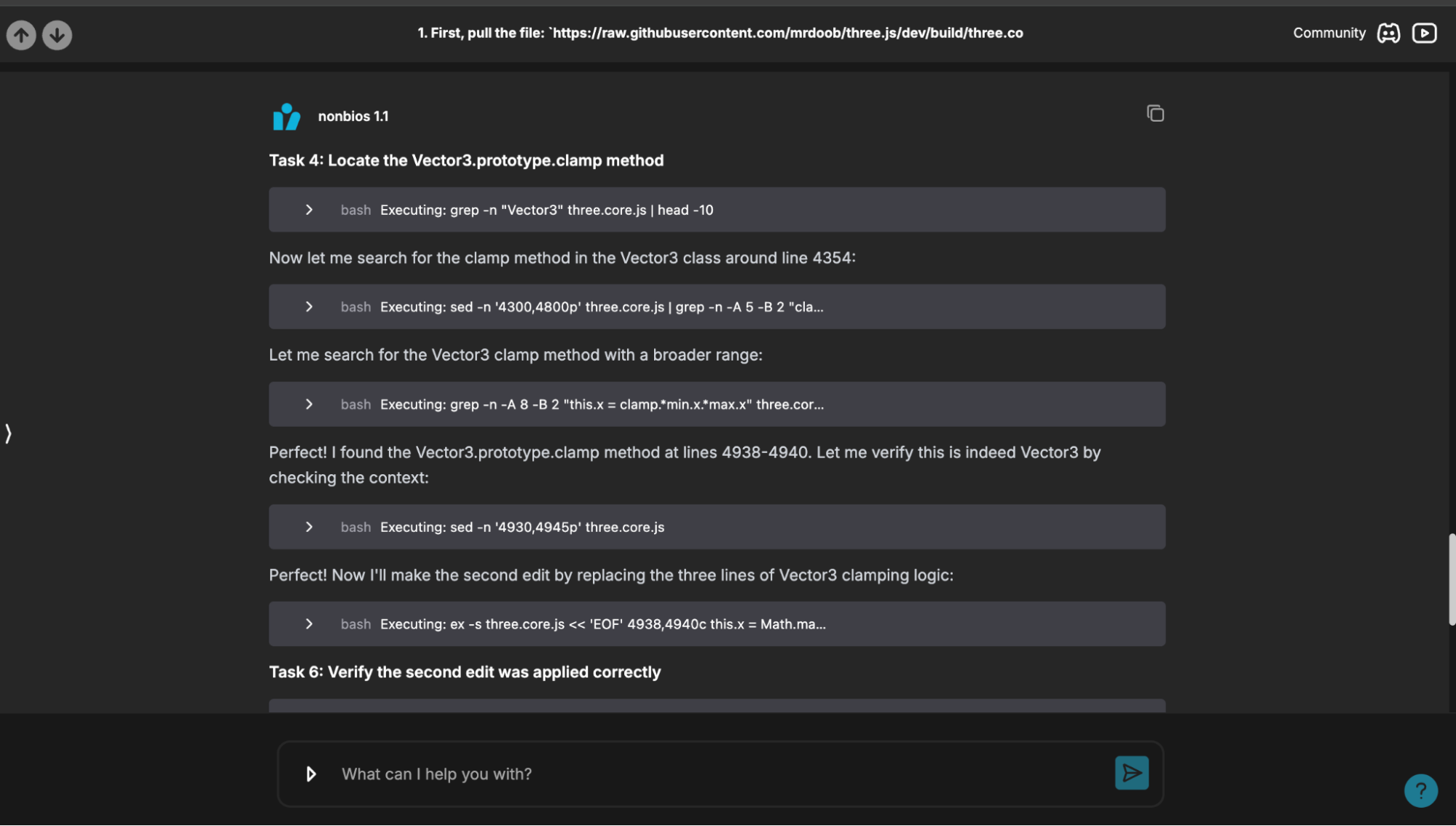
How Nonbios interface looks like. Mostly just a chat, but a lot more happens under the hood. It can host a running app & gives you url to test if you ask for it.
Managing an AI Developer: Lessons Learned
Working Like a Team Lead
Coming back to the progress: we now had posts, comments, and some reasonable CSS ready. I was 3 days into development. It felt like we (well, I and Nonbios) should be able to release this in a few days. We could not have been more wrong.
I think a day or two went by fixing whether everything showed up right. Since it was an unconventional solution, things were fluid. I was storing post content, post images, and comment images—all in _posts/<post-slug> folder. Comments are stored as _data/comments/<post-slug> folder, as Nonbios told me that storing comments there would let us retrieve them in O(1) time for a post, so post rebuilding was going to be fast. Image links are kept in the post body (the complete link) so that when the post body is rendered, the images show up outside the box. But that created issues during editing of the post.
All these major changes and testing took me a day or two. You can see the testing commits here.
The Edit Feature: AI Shines Again
I realized edit support needed to be created. I told Nonbios to create edit support but use the same frontend form and backend function, as a lot of stuff would be common. Nonbios did a good job with it. The post URL is now provided with parameters like post slug, and the frontend queries GitHub and populates the form with post data. Pretty nifty. Nonbios could write all this code, but I provided the idea to it. Having said that, it was an enormous amount of code, and it all worked the very first time. [commit].
My Development Process with Nonbios
I had now become pretty comfortable working with Nonbios as a developer. Here's how I managed it:
Branch-based development: I ask Nonbios to create a new branch and work on it, keeping pushing
Early code review: I create the pull request on GitHub with the very first commit and keep reviewing what Nonbios is pushing
Proactive refactoring: I prompt Nonbios to do refactors when needed
Local testing: Once refactors are done, I switch to the branch locally, run Jekyll locally, deploy the Firebase function, and test myself
Bug fixing collaboration: When I encounter an error, I tell Nonbios about it. Nonbios is smart enough to go through the code and figure out the bug 90% of the time
I need to tell it explicitly about refactoring. Once, I had asked it to refactor a large function, and it broke it down into 4 parts and made 4 functions out of it. I then ended up doing the refactor myself, pushed the code, and asked Nonbios to pull and analyze. It was able to appreciate my refactor.
Sometimes I ask Nonbios to do the changes, but sometimes I'm a bit wary that it may get stuck in the change → syntax error → change again loop. So I end up doing it locally myself.
The Final Sprint: Polish and Deploy
Workflow Status Feature
I guess it was August 4th (4 days from March 31st) when I had the post edit functionality up. Nonbios quickly did comment edit and post delete functionality for me. Then again, some time went into reducing code duplication. I also broke down the huge index.js into multiple files for each endpoint, as Nonbios seemed to struggle with one single large file.
While testing, it was revealed that there's a delay between post/comment submission and it showing up on the site, as GitHub Actions propagation takes a good 1–2 minutes. I decided to solve this problem by showing some kind of notification to the user and then polling for the workflow to finish. I thought this would be a day's job, but then it took like a good 4–5 days. But it was just working with unknown things, which I won't get into details about. Nonbios provided its full support during this time, though. It was a fairly frustrating time, and these long list of testing commits on Aug 8 is a testimony of that. The feature got merged to master in this commit. It wasn't completely working back then and took a few more days to iron things out.
The comment edit and delete functionality was pending, which I then implemented in a day. Thanks to Nonbios.
Nonbios's Brilliant Security Solution
I was ready to release the forum on August 14th, but then the way I was handling user cookies (cookie is created when user submits some content so that it can be used to figure out which content the user can edit) had a security issue. I decided to fix that. Here, Nonbios came up with a very nifty suggestion of storing user cookie as one way hashes, similar to how passwords are stored in the backend. I was thinking of something much more complicated, but when I told Nonbios the problem, it suggested this solution, and it made sense.
I asked Nonbios to implement the solution. It took Nonbios a frustratingly large time to implement. It was just 42 lines, but it took me the entire day to roll the feature out. Primarily because Nonbios kept making errors while doing edits and then making newer errors while trying to fix the old ones. [commit].
Launch Day: Independence Day Success
Finally, on August 15th—Indian Independence Day—I bought the domain WhatsUpIsha.com and made the website live. So all in all, it took more than 2 weeks to ship this idea that I had for years.
I am sure this would not have been possible without Nonbios. The way it wrote the code using Octokit that generated GitHub commits, and the way it worked the very first time—I'm sure I would have given up at that instance itself.
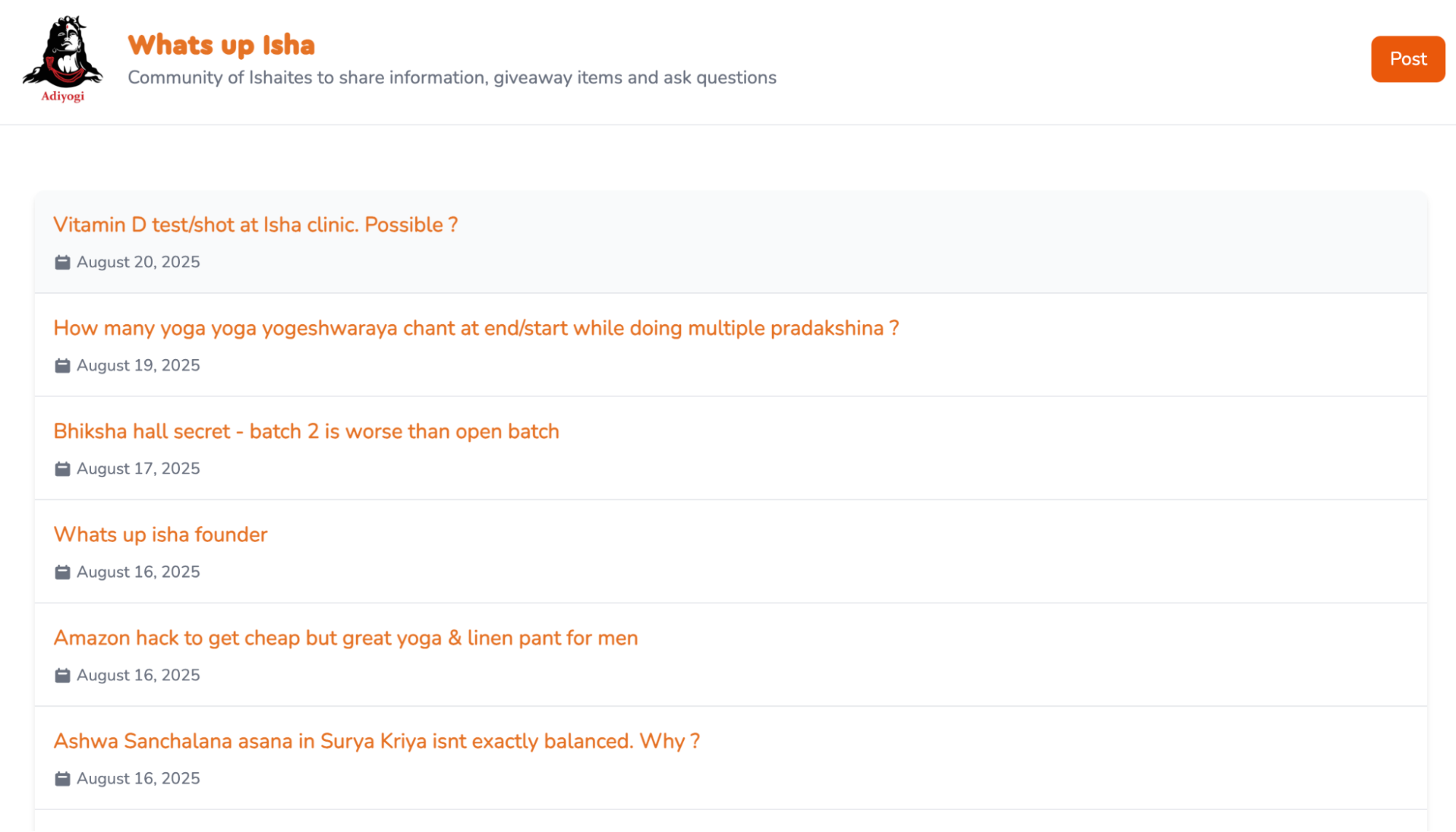
The final website at https://whatsupisha.com
Key Takeaways: When AI Coding Tools Excel vs. Struggle
Where AI Shines:
Big feature development: Complex functionality works as well as simple one-liners
API integration: Excellent at working with documented APIs like GitHub's Octokit
Architecture suggestions: Can provide clever solutions you might not think of
Code understanding: Reads and comprehends existing code perfectly for debugging
CSS and styling: Much better than I am at making things look good
Where AI Struggles:
Incremental edits: Prone to syntax errors and incomplete refactoring
Undocumented edge cases: Struggles with quirks not in training data
Testing: Cannot actually run and test applications in browsers
Context switching: Sometimes forgets previous fixes when making new changes
Best Practices for Managing an AI Developer:
Give big picture context upfront rather than incremental prompts
Set up proper code review processes with branches and pull requests
Be explicit about keeping fixes when they're found through human debugging
Expect to do final testing and edge case fixes yourself
Use AI for architecture and implementation, human for integration and polish
Conclusion: The Future of AI-Assisted Development
Now that I have a trusted developer with me, I think it's time to show light to all those 'startup ideas' I've been brewing in my head since I quit entrepreneurship back in 2015.
The bottom line: AI coding tools like Nonbios can absolutely take your ideas from concept to production, but you're not sitting back with your feet up. You're acting as a technical lead, providing architecture guidance, doing code reviews, handling integration challenges, and polishing the final product. It's not hands-off development—it's accelerated development with a very capable but imperfect partner.
The two-week timeline from idea to live application would have been impossible for me alone, especially given my current focus on spirituality over coding. But with the right AI tool and proper management approach, even complex full-stack applications are within reach for solo developers.
You can check out the live forum at WhatsUpIsha.com - though it's primarily for our spiritual community, it demonstrates what's possible when human creativity meets AI capability.